Creative Summer PowerPoint Template
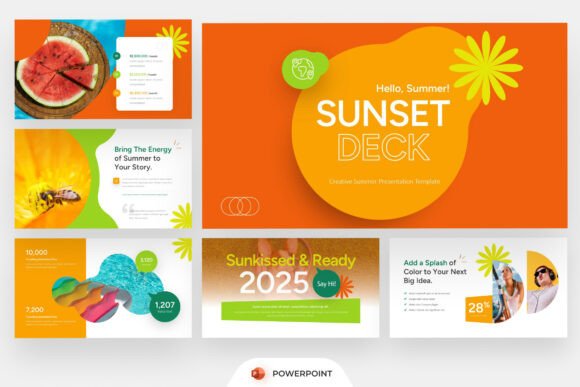
Summer isn’t just a season—it’s a mood, a rhythm, a visual language. Bright light, relaxed pacing, bold color choices, and storytelling that feels alive. The Creative Summer PowerPoint template meets that energy head-on: a thoughtfully built, fully editable presentation toolkit designed for people who need to communicate with clarity *and* character.
This isn’t a collection of generic slides dressed in yellow and blue. It’s a cohesive system—16 widescreen (16:9) slides—structured to support real work: launching a boutique travel service, pitching a lifestyle brand, briefing a creative studio team, or sharing a seasonal product roadmap with stakeholders. Every layout serves intention, not just aesthetics.
What Makes It Work Beyond the Surface
The strength of Creative Summer PowerPoint lies in how its features align with actual creative workflows:
- Editable slides mean you’re not locked into someone else’s hierarchy—you can reorder, delete, or repurpose any slide without breaking formatting;
- Infographic sections and timeline elements help turn data-heavy updates (like campaign milestones or seasonal performance) into digestible, visually anchored narratives;
- Roadmap visuals aren’t just decorative—they’re functional scaffolds for explaining phased rollouts, product development cycles, or even personal project timelines;
- Promotional content blocks give marketers and small business owners ready-made space for offers, limited-time messaging, or social proof—without needing design time;
- Fresh editorial compositions guide how text, icons, and whitespace interact—so even non-designers maintain balance and readability.
All fonts are included and free to use—no licensing surprises. And because it’s built in PowerPoint, it works across devices, integrates smoothly with Teams or Zoom presentations, and exports cleanly to PDF when needed.
Ideas in Action: Who Uses It—and How
Different users find different entry points. Here’s how the template adapts across roles and goals:
For Travel Agencies & Tourism Marketers
A regional tourism board used Creative Summer PowerPoint to pitch a “Coastal Revival” summer campaign to local businesses. They replaced stock image placeholders with authentic photos of nearby beaches, festivals, and small vendors—then layered in custom infographics showing projected visitor growth, peak booking windows, and partner benefits. The timeline slide became their activation calendar, clearly mapping out social media drops, pop-up events, and media outreach phases.
For Creative Studios & Freelancers
A branding studio repurposed the template as an internal pitch deck—not for clients, but for onboarding new team members. They kept the vibrant color palette but swapped promotional copy for studio values, process diagrams, and team role maps. The roadmap slide illustrated their typical 12-week client journey, while infographic sections clarified how research, strategy, and design phases intersect.
For Educators & Workshop Facilitators
An outdoor education nonprofit redesigned the template for a summer youth leadership series. They simplified text density, added icons for each learning module (e.g., “Team Challenge,” “Nature Journaling,” “Community Mapping”), and used the timeline slide to show weekly themes—not deadlines, but experiential anchors. Consistency came from reusing the same icon set and color-coded section headers across all slides.
For Startups & Small Business Owners
A sustainable swimwear brand used the template for a seed-funding update to early backers. Instead of financial jargon, they visualized progress through three key metrics: units shipped (bar chart), customer stories (testimonial carousel layout), and community growth (map + dot visualization). The promotional block slide highlighted their upcoming summer pop-up—complete with date, location, and RSVP CTA.
Staying Clear, Consistent, and Audience-Focused
Great templates don’t guarantee great results—how you use them does. A few practical habits keep presentations grounded and effective:
- Start with your audience’s question—not your content list. Ask: “What do they need to understand, decide, or feel *by the end*?” Then prune every slide that doesn’t serve that goal.
- Respect the 16:9 frame. Don’t cram. Use the built-in margins and spacing cues. If text overflows, cut words—not font size.
- Customize color meaning—not just appearance. Assign specific hues to ideas (e.g., teal = sustainability actions, coral = community moments) so viewers subconsciously track themes across slides.
- Replace placeholder images with purpose. Even if stock isn’t included, choose photos where people look engaged, environments feel authentic, and lighting matches the warmth of the template’s palette.
- Use the Help Guide—not as a last resort, but as a first reference. It clarifies layer naming, animation logic, and which elements scale safely. That saves hours when adjusting layouts.
Realistic Adaptation, Not Just Decoration
You don’t need to be a designer to adapt Creative Summer PowerPoint. You do need to know what your message is—and where your audience’s attention naturally lands. A teacher presenting summer reading programs might emphasize clean typography and strong section headers; a festival organizer may lean into bold color blocking and photo-driven layouts; a tech startup explaining a summer feature rollout might simplify graphics and add subtle data callouts.
The template gives you structure—not constraints. Its flexibility shows up in quiet ways: the way headline fonts pair with body text, how icon alignment guides the eye, how consistent spacing reduces cognitive load. These aren’t flourishes. They’re usability decisions baked in.
If you’ve ever spent more time wrestling with slide layouts than refining your core message, this is the kind of tool that restores balance. It doesn’t replace thinking—it supports it. It doesn’t dictate tone—it invites interpretation. And because it’s built for real use cases—not just gallery appeal—it stays useful long after the season ends.
Whether you’re planning a beachside workshop, launching a seasonal subscription box, briefing a remote team, or sharing impact stories with donors, Creative Summer PowerPoint offers a starting point that’s both energizing and efficient—so you spend less time formatting and more time connecting.